IoT Security PlatformSecuring the connected enterprise.
A modern IoT Cyber Security platform for enterprise environments — helping IT and security teams monitor connected devices, detect suspicious behavior, and control network access in real time.
Transforming complex security monitoring into a clear and actionable experience.
This project focused on designing a modern IoT Cyber Security platform for enterprise environments. The system helps IT and security teams monitor connected devices, detect suspicious behavior, identify security breaches, and control network access in real time.
The platform provides visibility into all IoT assets connected to the network, including printers, cameras, smart locks, displays, and additional unmanaged devices.
As a Senior Product Designer, I led the UX and UI redesign of the platform, focusing on simplifying security workflows, improving information hierarchy, and creating scalable interaction patterns for large enterprise systems.
My Role
Senior Product Designer
Platform
Desktop (Enterprise)
Focus
IoT Security
Type
UX & UI Redesign
Enterprise IT teams struggling with a growing IoT surface.
Existing security tools were highly technical, visually overloaded, and difficult to manage during critical situations.
Lack of Visibility Across Connected Devices
Administrators had difficulty understanding which devices were connected, vulnerable, blocked, or compromised, and what type of threat existed on the network.
High Cognitive Load
The system displayed large amounts of technical information without clear prioritization, making it difficult to quickly scan and respond to security incidents.
Complex Access Control Management
Managing approved destinations and network permissions required too many steps and lacked contextual visibility.
Weak Information Hierarchy
Critical alerts, device categories, and attack analytics competed visually, reducing usability during high pressure workflows.
Inconsistent Workflow Experience
Users moved between disconnected screens and configuration states, causing friction and increasing the risk of configuration mistakes.
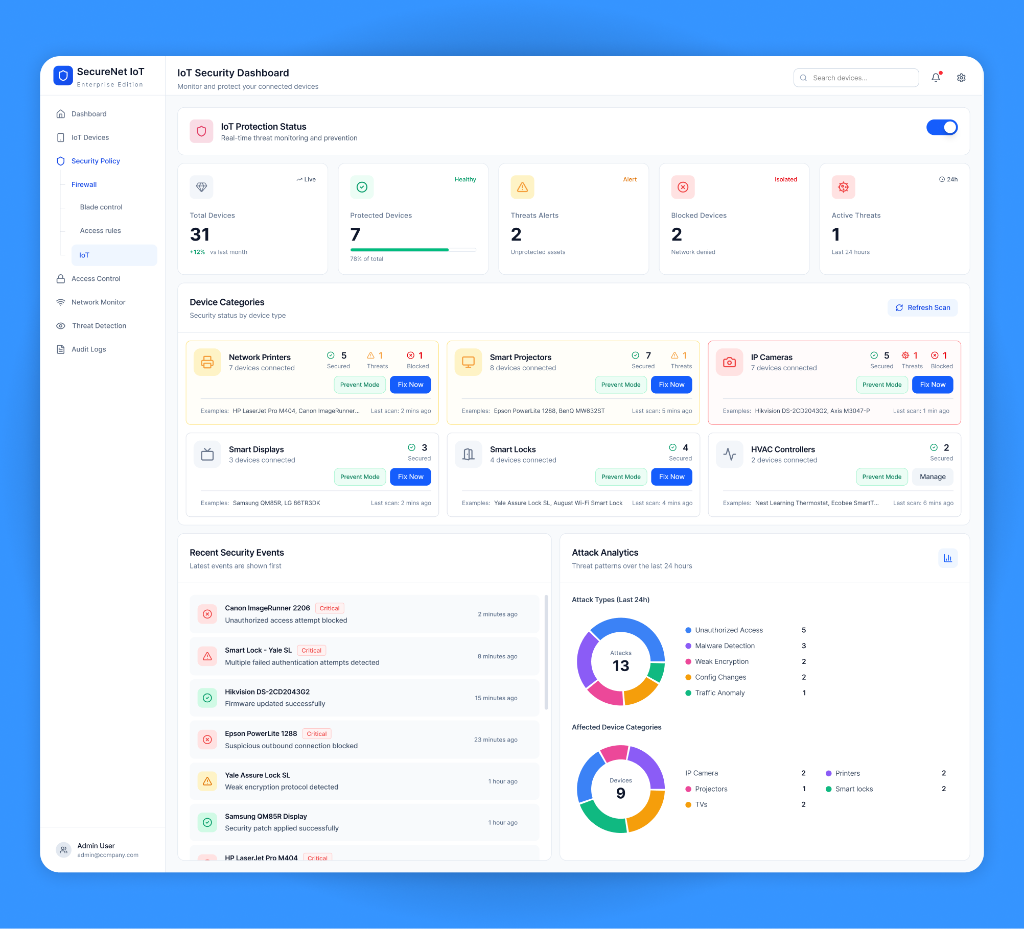
Modular cards. Stronger hierarchy. Faster decisions.
Security teams need to prioritize alerts quickly. The dashboard design separates device states and places critical information first.
Created clear device category cards
Added visual separation between secure, blocked, and risky devices
Improved real time threat visibility
Simplified attack analytics visualization
Introduced structured spacing and cleaner typography
Improved scanability for high pressure monitoring workflows
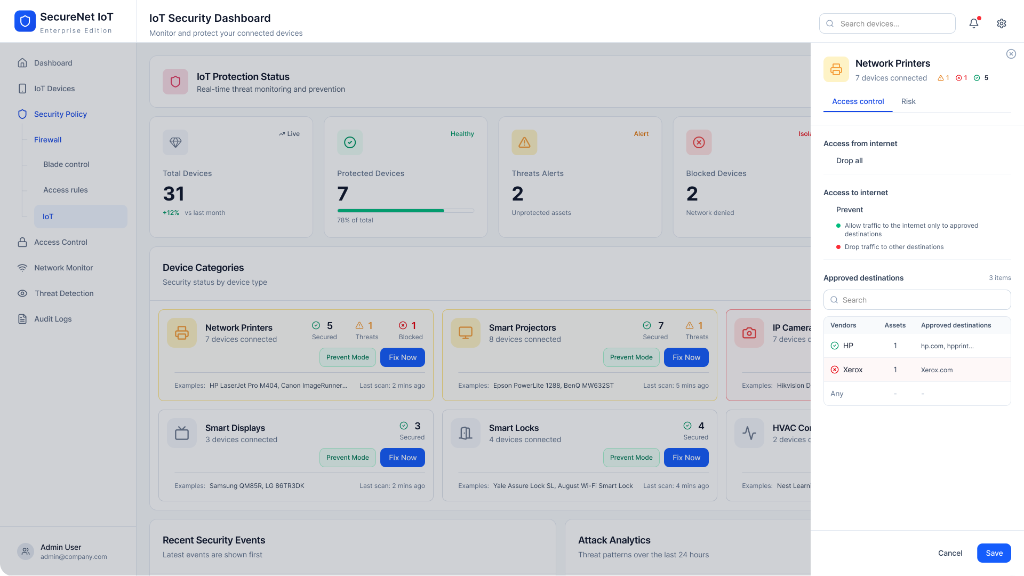
A context-preserving drawer experience.
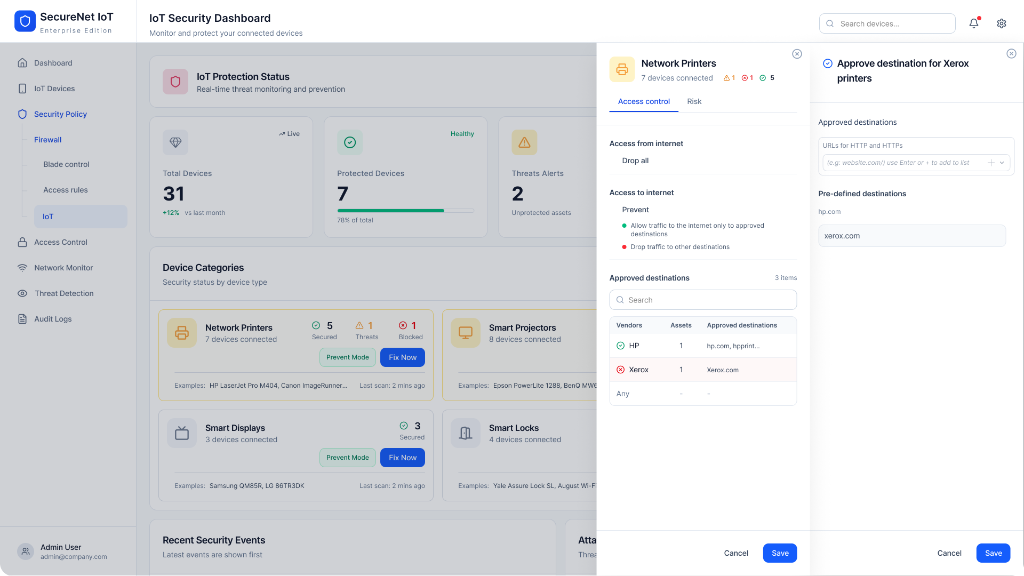
Security administrators often work under pressure while handling multiple network risks simultaneously. Moving users away from the dashboard during configuration increases mental load and reduces operational awareness. The drawer system keeps users anchored within the security context while allowing fast inline configuration changes.
The Drawer Allows Users To
Monitor device information
Manage risks
Approve destinations
Configure permissions
UX Principles Applied
Progressive Disclosure — information revealed gradually through layered drawers
Context Preservation — users stay anchored to the dashboard
Clear Security Decision Making — understand vendors, detect blocked destinations
Consistent Interaction Patterns — unified forms, tables, actions, and save flows
Senior Product Designer
I was responsible for the full scope of the redesign from strategy through to high-fidelity UI.
End to end UX strategy
UI redesign
Information architecture
Security workflow optimization
Interaction design
Design system thinking
Enterprise usability improvements
High fidelity UI design
User centered security experience
A cleaner, more intuitive security platform.
The redesigned screens support the following administrator tasks:
Review device states and threats
Inspect destinations before changing access
Manage device permissions in context
Improve visibility across connected devices
Keep monitoring information visible during configuration
Back to Start