
GreenLeaf Plant Store
Dashboard for SMB & sales management
Desktop | Year 2024
My Role UX & UI design
Overview
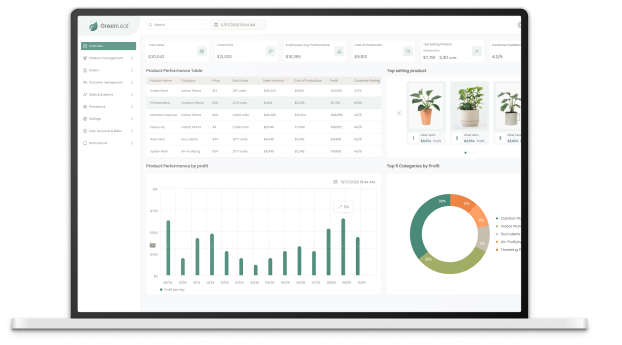
In today’s fast-paced retail environment, managing both a physical and an online store can be complex and overwhelming for store managers. With inventory, sales, customer management, and profit analysis all playing crucial roles in a store’s success, a comprehensive management system becomes essential. This system simplifies daily operations and enables managers to focus on what truly matters—growing their business and increasing profits.
I designed this User Experience (UX) and User Interface (UI) to reflect the needs of store managers by tracking their flow and processes in running their stores.
Through careful research and design iterations, I developed this system to be intuitive, user-friendly, and powerful. My work on the dashboard reflects my understanding of their daily tasks, including:
- Monitoring product sales and stock levels in real-time.
- Understanding which products perform best and optimizing inventory accordingly.
- Using analytics to identify top categories by profit and customer preferences.
- Managing customer feedback and overall store performance.
The Challenge
Store managers face the ongoing challenge of juggling multiple tasks simultaneously across both physical and online stores. Key issues include keeping track of inventory, managing fluctuating sales data, handling customer feedback, overseeing employee performance, and ensuring overall store profitability. Often, these tasks are dispersed across different systems, leading to inefficiency, errors, and missed opportunities for growth.
The solution
This management system is designed to alleviate these daily struggles by consolidating all crucial functions into a single, easy-to-navigate dashboard. It provides a comprehensive overview of sales, inventory, and customer feedback, all in one place. The key ways this system helps are:
Sales Analytics and Insights: The system automatically tracks top-performing products, profit margins, and customer preferences. Managers can quickly identify trends and make adjustments, such as promoting best-sellers or adjusting prices on underperforming products.
Profit and Performance Monitoring: With a clear view of the store’s financial performance, managers can track profits and expenses, helping them focus on boosting profitability. Daily, weekly, and monthly reports provide valuable insights for decision-making.
Simplified Customer Feedback Management: Managers can view customer feedback and ratings at a glance, enabling quick responses to improve customer satisfaction and loyalty.
Centralized Control: Whether overseeing multiple locations or managing both online and physical stores, this system centralizes all data and management tasks in one place, making day-to-day operations smoother and more efficient.

The goal
The main goal for any manager, whether running a physical or online store, is to maximize profits. This system is built to provide the right insights and tools to make data-driven decisions quickly, helping managers allocate resources efficiently and improve their store’s profitability.
By combining my design expertise with a deep understanding of the manager’s daily workflow, I was able to create a system that not only looks clean and modern but also addresses the core needs of store management. Through these screens, I aim to showcase my capabilities in developing impactful solutions that drive business success.
Product list screen
In the Product List screen, the user is immediately presented with a clean, organized overview of all products. The simplicity of this interface allows store managers to quickly scan through their inventory, checking important details like category, price, total sales, and profits with just a glance. Each product is clearly categorized, and managers can easily sort and filter the data to focus on specific areas, such as best-selling items or low-stock products. This screen plays a crucial role in enabling the user to stay on top of inventory management and make swift, informed decisions. With the clarity provided, they can confidently manage both physical and online stock, ensuring optimal sales performance and customer satisfaction.

Add new product screen
The Add New Product screen is designed with equal attention to usability and simplicity. This screen guides the manager step-by-step through the process of adding a new product to the system, making it intuitive even for first-time users. Each input field is clearly labeled, from product name and category to pricing and stock levels, ensuring no detail is overlooked. The ability to add images, descriptions, and even variations like size or color ensures products are accurately represented across platforms. By streamlining this process, the screen eliminates any confusion, empowering users to quickly update and expand their inventory. This flow is essential to the overall goal—ensuring managers can efficiently maintain an accurate, comprehensive product database and keep their stores running smoothly.

The persona

Sarah Mitchell
Age: 32
Job Title: Retail Operations Manager
Company: GreenLeaf
Location: Denver, Colorado
BIO
Sarah Mitchell is a dedicated retail operations manager responsible for overseeing both a brick-and-mortar store and an e-commerce platform. She has extensive experience in managing product inventories, sales operations, and staff performance. Her day-to-day involves juggling multiple tasks, including stock management, analyzing sales data, responding to customer feedback, and ensuring her store is running smoothly. Sarah prides herself on being detail-oriented and is always looking for ways to optimize store performance to meet profit goals.
Tech
Sarah is very comfortable with management software and enjoys working with technology that simplifies her workflow. She values systems that provide automation and detailed reporting but prioritizes ease of use.
Hebits
Sarah Mitchell starts each day with a review of inventory levels, checks sales reports to track trends, monitors customer feedback, holds team meetings to set priorities, ensures product listings are updated, sets weekly goals for sales and customer satisfaction, and continuously learns about new retail management trends to stay ahead.
Goals
- Maintain efficient management of inventory across both the physical and online store.
- Maximize profits by identifying top-selling products and optimizing stock and pricing strategies.
- Automate routine tasks like adding new products and tracking sales to reduce workload.
- Ensure a seamless customer experience by promptly addressing customer feedback and product inquiries.
- Track overall store performance, including profits, employee output, and customer satisfaction.
Key user flow: Adding new products for efficient daily management
I designed two more screens to reflect one of the main user flows that will be used frequently: adding a new product to the system. This flow is essential to ensure that users can efficiently manage their products and accurately understand the details. By simplifying this process, the system helps users organize their products correctly, leading to better product management and informed decision-making. By creating and designing this flow, I was able to showcase key screens that the user will interact with on a daily basis, making them crucial to the overall functionality of the system.